Image and video hosting by TinyPic Kesempatan Tidak Datang Berkali-kali, Melainkan Hanya Sekali Saja ! ---------- Maaf Bila Kurang Lengkap Menunya. ---------- Soalnya Baru Coba . ---------- Bro.... !Image and video hosting by TinyPic
Showing posts with label software. Show all posts

19 October 2012

USB Virus Scan v2.4 Build 0827

USB Virus Scan v2.4 Build 0827
USB Virus Scan v2.4 Build 0827 | 3.8 Mb

USB Virus Scan provides fully USB security solutions , it not only allows you to gain full control of every usb port, but also provides 100% protection against any malicious programs trying to attack via USB storage.

Key Features

Get control over the use of all USB storage devices
You can set the USB drive status to Read only or Readable/Writable both on the machine, also you can disable usage of any usb storage devices to prevent data leaks across USB flash drives. more information

100% protection against any virus via USB drives
USB Virus Scan uses innovative technology to block any threats via USB drive,any USB drives inserted into computer, USB Virus Scan will automatically scan it and remove threats. There are relatively few products available in shops or on the Internet which can offer even close to 100% protection against any malicious programs via USB drive. The majority of products are unable even to guarantee 60% protection.

Clean USB virus in your infected system
USB Virus Scan can not only block virus spreading thought external removable media, but also has the ability to detect and remove usb virus in your computer. What you need to do is clicking the scan button,and waiting for virus scan to complete.

The best solution to protect offline computer
Other antivirus software should update signature database regularly, and they can not effectively protect offline computer that is not connected to the Internet. When new viruses, worms and other malicious attacks strike, traditional signatures are insufficient. USB Virus Scan uses advanced detection techniques, it doesn't mainly rely on virus signature, so it can protect offline computer from usb virus effectively without updating frequently.

The world's fastest and smallest antivirus software
With USB Virus Scan, it’s not necessary to sacrifice speed for detection and scanning. Compare with other antivirus software and you'll discover that USB Virus Scan installer is just 1 MB. The program utilizes approximately 5 to 8 MB of RAM.

100% compatible with all software
Incompatibility between antivirus programs is an issue. In the vast majority of cases, installing two antivirus programs from different vendors on one machine (for increased protection) is technically impossible, as the two programs will disrupt each other's functioning. However, USB Virus Scan is 100% compatible with all other security products in fully testing, including Norton,Nod32,Bitdefender,Kaspersky,etc.

Easy to use
USB Virus Scan has been specifically designed to perform effectively regardless of the user’s level of computer expertise.
Just install and forget it.

No recurring payment, the license key is lifetime
Other antivirus products should be paid for updates every year. The USB Virus Scan keys are lifetime. You receive all future program updates free of charge.

Home Page: http://www.usbvirus.com

16 September 2012

GamePad Companion 3.1.1 (Mac OS X)

GamePad Companion 3.1.1 (Mac OS X)
GamePad Companion 3.1.1 (Mac OS X) | 5.1 Mb

GamePad Companion enables you to configure your gaming device to act as a keyboard or mouse. With GamePad Companion you can use your gaming devices with every game and app, even if they don't have built-in support for those devices!

GamePad Companion works with all gaming devices that conform to the USB HID (Human Interface Device) standard. For more information on devices you can visit GamePad Companion support.

Note: X-Box 360 gamepad users, please read the notes about X-Box 360 gamepads on our support webpage. It has important information pertaining to the use of X-Box 360 gamepads, and the drivers required to use them with Mac OS X.

What's New in Version 3.1.1
1."Enable mice" adds support for HID (Human Interface Device) USB mice. *This feature was added for the purpose of configuring the buttons on some USB mice that do not already have values assigned to their buttons, for example the “Right Click, Left Click, and Center Click” buttons already have values. It is not meant for gaming mice, and will not override the mouse functions of any button that has a pre-configured value. This is meant for the average user, with a mouse that has 2 or 3 extra buttons and wishes to configure those buttons for functionality.

2. Adds linguistic support so that GamePad Companion can be used with both the Italian, and Spanish languages.

3. Minor changes to the UI (User Interface) by moving the location of "Steam Mode" and adding the "Enable Mice" check boxes to the "Options..." menu.

Download


http://extabit.com/file/278tlhuhidus9/Ga311.comp.rar
or
http://lumfile.com/rkawdmnvx37p/Ga311.comp.rar.html

Panda Internet Security 2013 Review


Image comment: Slow scanning suite that needs to rejuvenate protection components

Slow scanning suite that needs to rejuvenate protection components

Panda Internet Security 2013 by Panda Security See editor's ratings     Request a review
Version reviewed: Panda Internet Security 2013 18.00.01
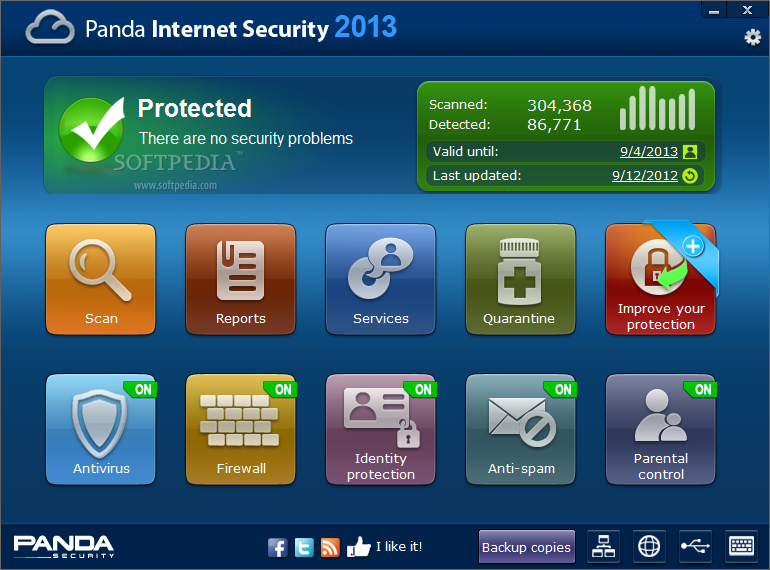
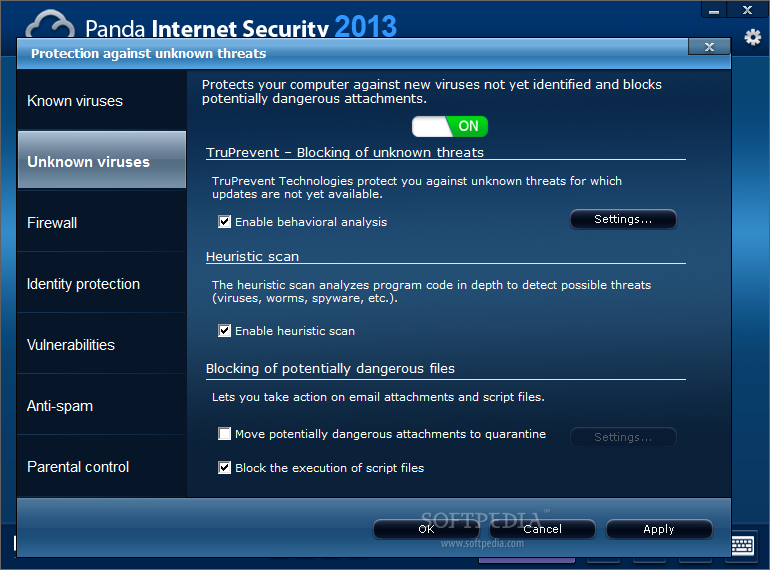
Panda Internet Security is a comprehensive security solution designed to keep all sorts of malware at bay. It also includes parental controls and a virtual environment for safe browsing.

Download Panda Internet Security 2013
Features:

Antivirus / Firewall
Antispam / Identity Protection
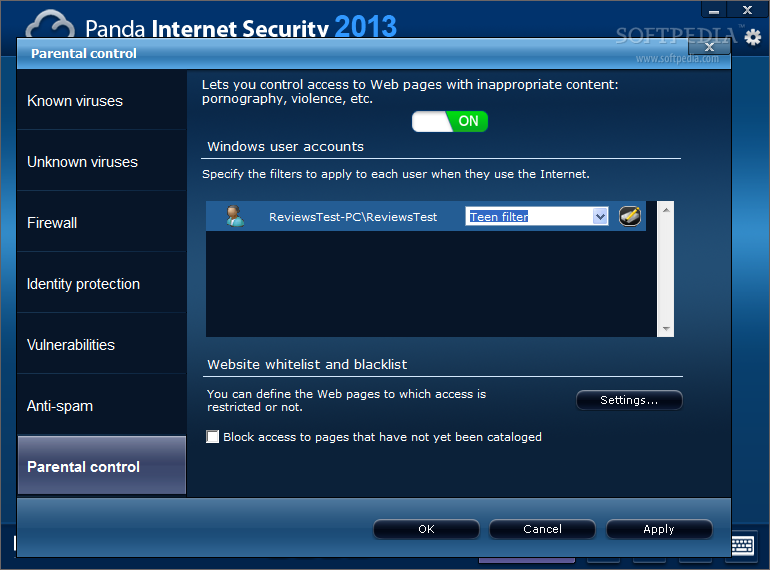
Parental Control
Backup & Restore
Multimedia/Gaming Mode
Home Network Manager
Remote PC Access
Panda Safe Browser (Sandboxing)
Internet Security is Panda Security’s mid-range product that combines all anti-malware layers of protection produced by the company, but lacks the modules for PC optimization, file encryption, file shredding and password management.

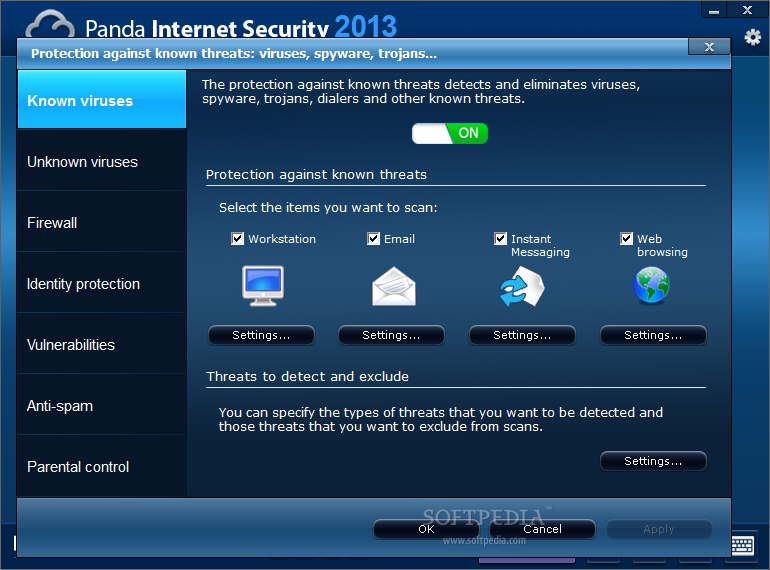
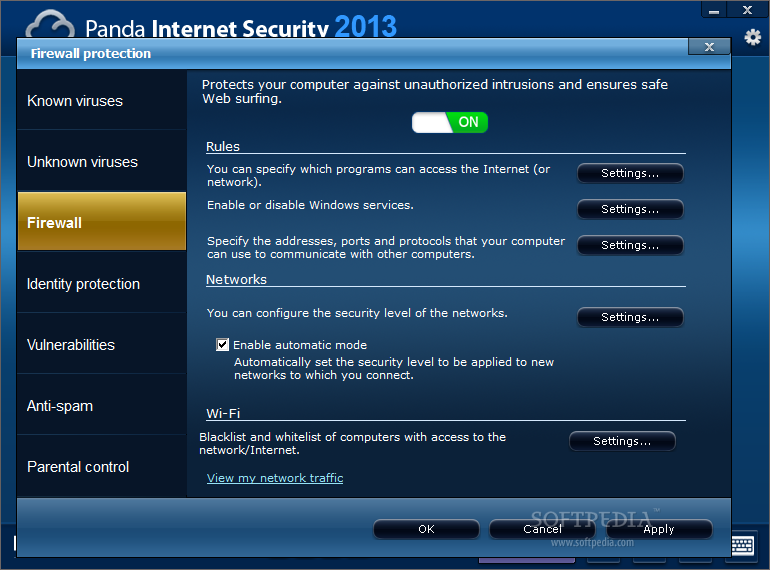
Besides the antivirus, it incorporates a two-way firewall, identity protection, anti-spam and parental controls.

Additionally, it can install USB Vaccine, a tool that blocks infections propagating through autorun.inf on USB drives, and Safe Browser, which is a virtualized browser that allows you to conduct sensitive financial operations online.

The 2013 edition of Panda Internet Security introduces a new scan manager, which is designed to increase the file processing speed by up to 70% by leveraging system resources and kicking in only when necessary.

Part of the protection is based on cloud knowledge, which is why the 2013 is touted as reaching the user faster, thus contributing to keeping the newest pieces of malware at bay.

Looks have also been tweaked to offer users easier access to modules and advanced options intuitively hidden for the more seasoned user, putting simplicity and ease of use first. Also, the menus have been turned into tiles making the bundle suitable for use on Windows 8 touch interface.

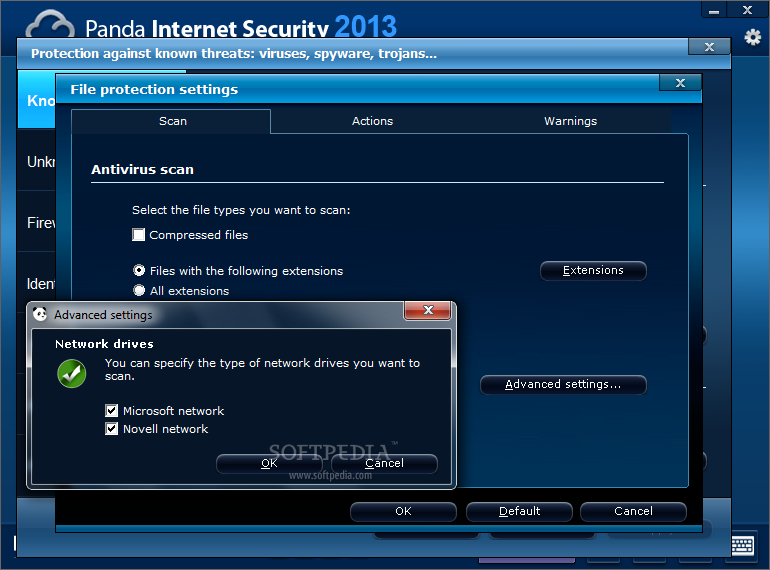
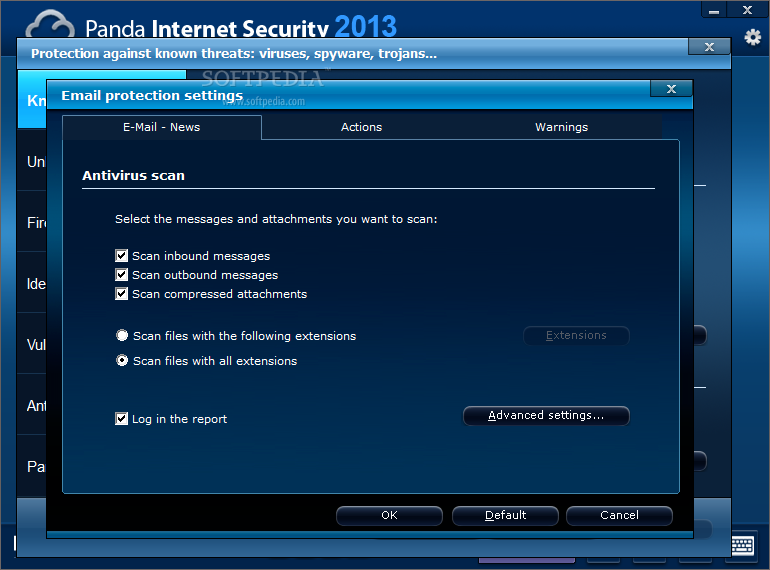
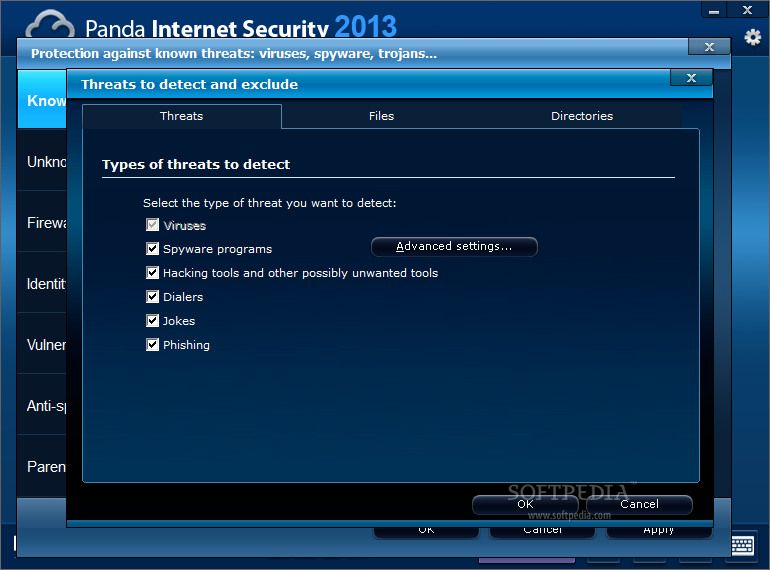
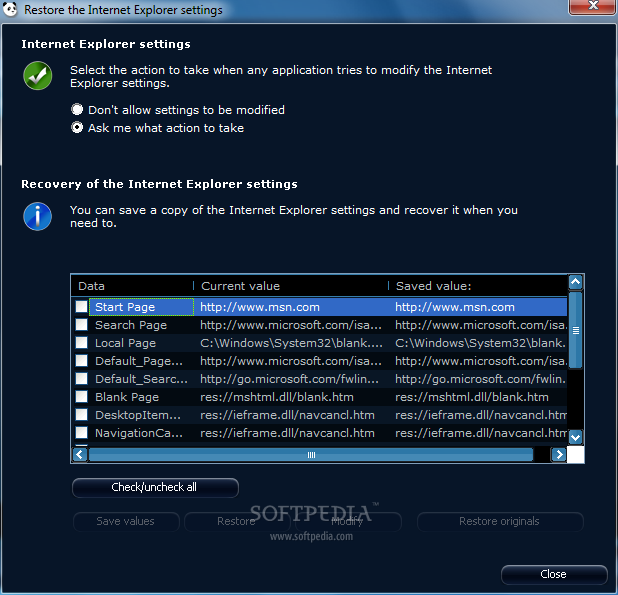
Review image Review image Review image Review image Review image


The price for the 2013 edition varies from country to country (even in Europe) but, for the US, it is $69.99 for three PCs for one year, although this should not be taken as a reference.

Installation is fast this year and completes without user intervention. We needed to reboot the system in order to finalize the procedure.

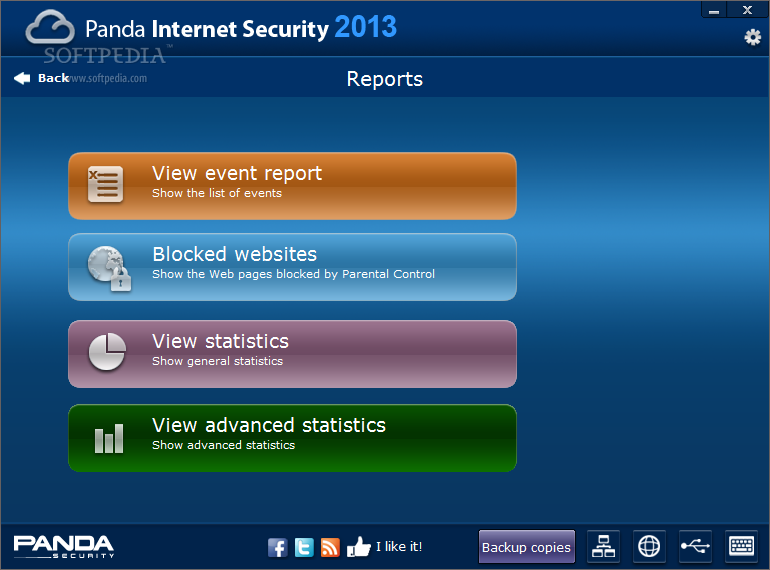
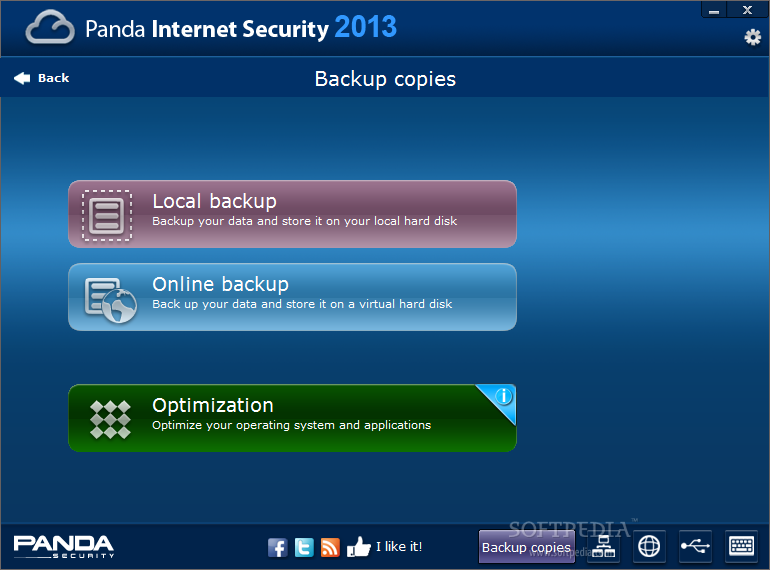
All modules available in the package are tiled in the landing screen, with some extra options neatly arranged in the lower left part of the interface. These are tools for backing up your data, network management of stations running Panda solutions, Safe Browser, USB Vaccine and Virtual Keyboard.

Safe Browser, just like in the previous editions, is not integrated in Panda Internet Security, and you have to download it separately and install on the system. It is free of charge, but requires VirtualBox in order to function.

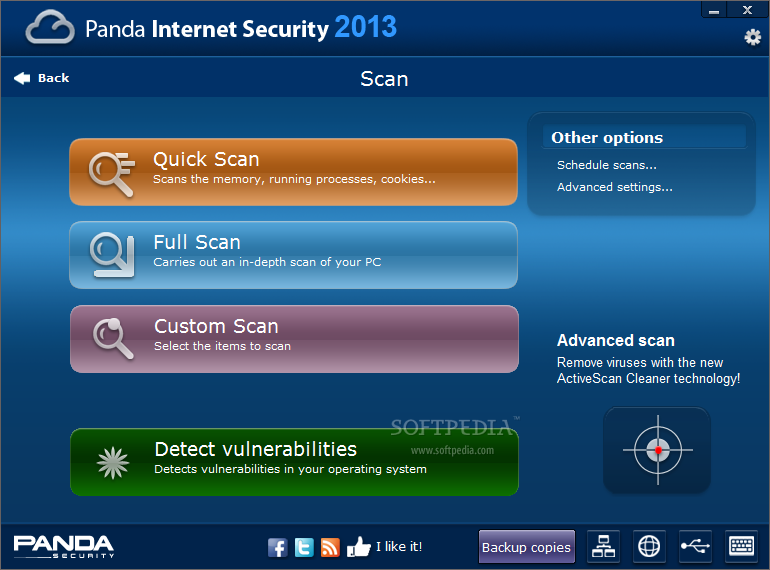
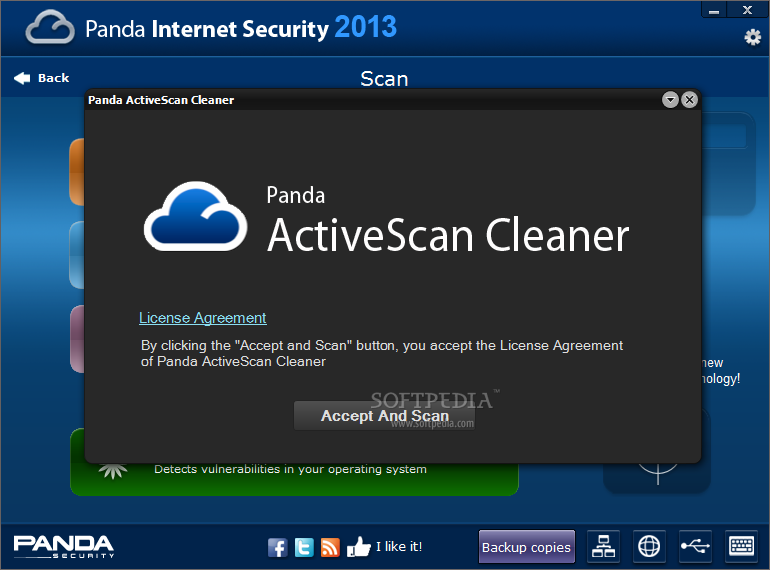
The scan options available include the regular choices (Quick, Full and Custom), but there is also ActiveScan Cleaner, offered as an advanced scan solution for removing malware currently active on your computer.

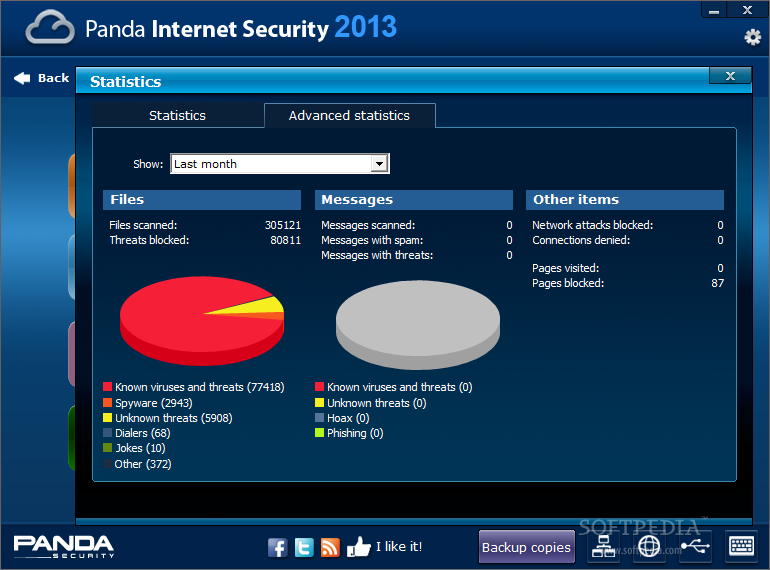
We used the same malware database as in the case of Bitdefender Total Security 2013 (reviewed here) to test the detection and elimination abilities of Panda Internet Security 2013. The entire process took a lot longer than we expected, as well as compared to other suites we subjected to the same on-demand scan tests.

We would often see no activity on the scan screen, but if we waited long enough, we’d see the needle moving again and the progress percentage jump to a higher value. After processing all the files, the engine eliminated 67,451 of the samples and notified us of 17 infections.

Review image Review image Review image Review image Review image


This would amount to a 68% detection and elimination rate. However, the value is increased by behavioral analysis technology, dubbed TruPrevent, which acts against unknown threats that evade regular detection.

The built-in firewall is no fancy tool and our tests showed that it is on par with its counterpart in Bitdefender Total Security 2013. On its own, it showed that it is susceptible to DLL injection, leaking information through Windows DNS APIs or modification of services in the registry. But in defense to Panda Internet Security, many of the attacks were dismantled by the behavioral shield.

While testing the suite, we received multiple firewall conflict alerts. The message stated that Windows Firewall was active and advised disabling it and running Panda’s solution. Despite acting as recommended, the messages kept popping up and we proceeded to disabling Windows Firewall completely; but even so, the alerts continued.

As Pedro Bustamante, senior research adviser at Panda Security, explained to us, they are aware of the bug that causes incorrect detection of inactive Windows Firewall and are working on a fix.

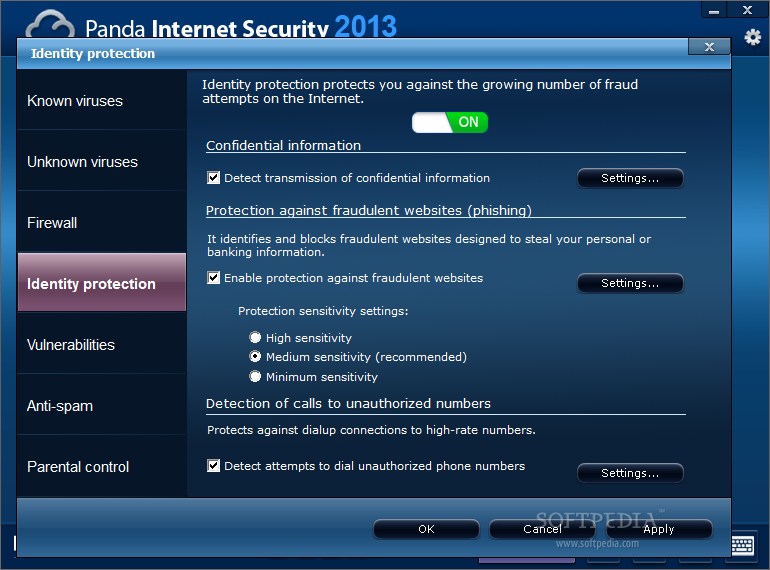
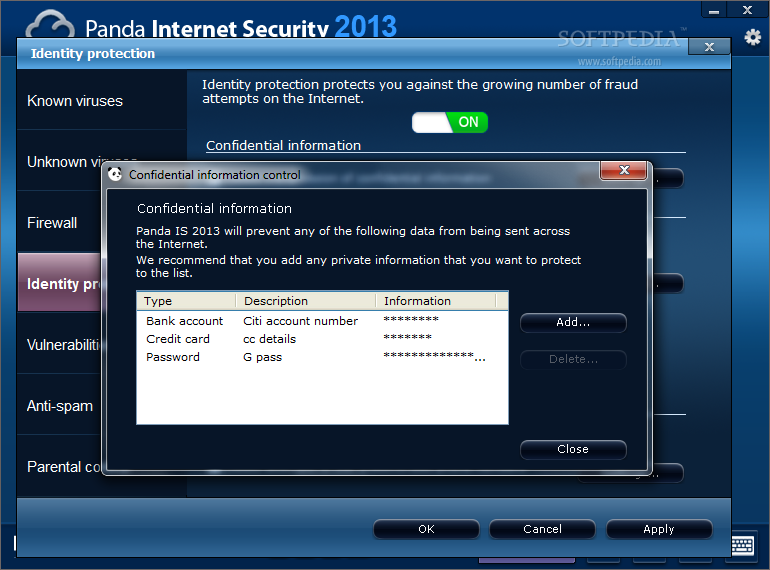
Identity Protection module seems to have undergone no change. The moment it detects transmission of confidential information, it will simply emit an alert asking for permission or denial of the operation. This applies to all unencrypted connections.

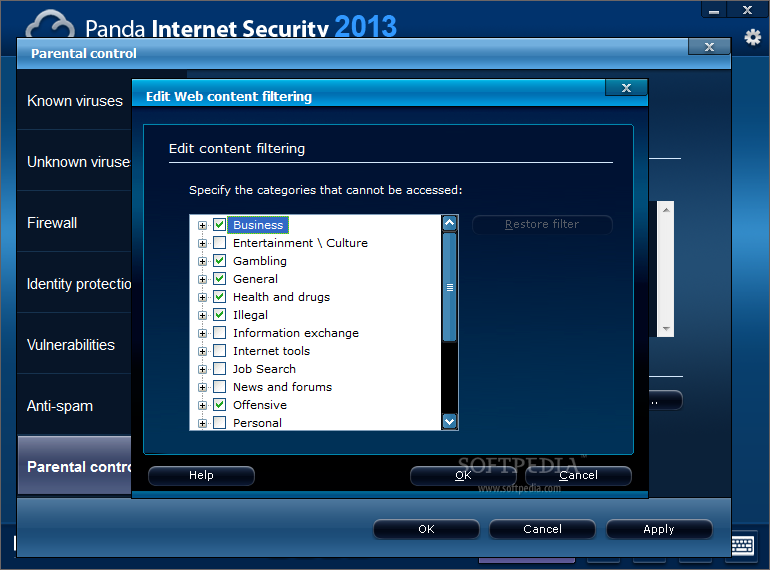
The Parental Control module also seems unchanged, vulnerable to the same bypasses we tested in Global Protection 2012 and Internet Security 2012. It remains underdeveloped and unadjusted to today’s standards that also include the possibility to restrict applications from running or Internet activity.

Review image Review image Review image Review image Review image


User profiles are outdated and it seems like it cannot restrict access to “https://” pages despite them being added to the untrusted URL list. But more importantly, it allows access to subdomains of a blocked domain. This is a door wide open to resources you might otherwise prevent your kid from being exposed to (such as adult content) if they “stumbled” onto the links.

Protection against phishing attacks is also integrated in the suite and, although not the best, our tests showed it can be a powerful ally, especially in combination with a browser with built-in mechanisms to defend you against web forgeries of this sort.

We used 36 fresh phishing sites and Panda managed to detect 27 of them. It let nine of them through, which makes for a detection of 75%.

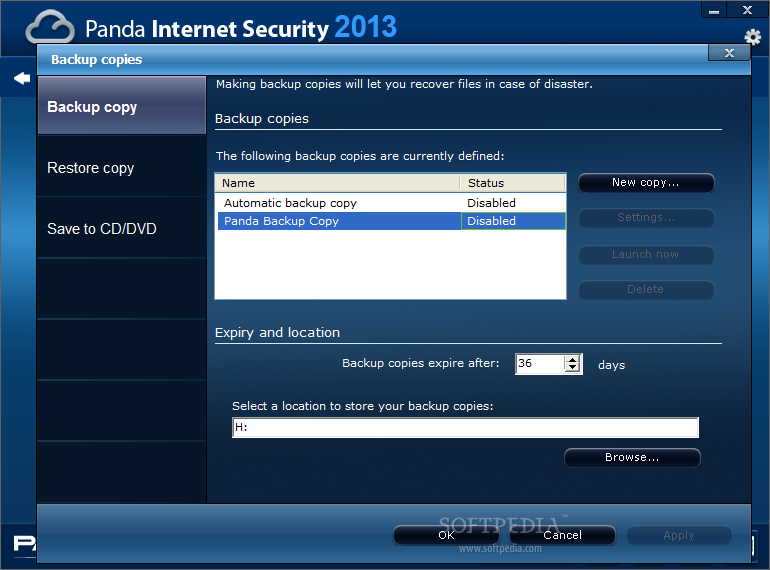
Backing up with Panda Internet Security 2013 is no tough thing. It is a simple operation that can be carried out either locally or online, if your data can fit in 2GB of free space Panda Security customers get through the company’s partnership with Mozy online backup service. However, the 2GB of cloud storage is freely available to anyone signing up with Mozy, no strings attached.

The options for a local backup let you schedule when safe copies of your data should be created and where they should be stored. You can also opt for immediately starting the operation as well as define an expiration period, when they are deleted.

Review image Review image Review image


The Good

The new interface improves usability. You can prevent sensitive information from slipping out of your computer. USB Vaccine efficiently dismantles malware attacks carried out through autoplay.

The Bad

Scan speed took much longer than expected. Safe Browser needs to be downloaded separately and online backup feature is outsourced to Mozy backup service. USB Vaccine is not inherent and needs to be installed.

At one moment an information dialog popped up in Spanish, although the working language was set to English and during testing the interface crashed several times (protection services kept running).

Parental Control module did not improve over the year and is still limited only to restricting web content, to some extent.

The Truth

With competition rolling out new features that attend to various degrees of security, Panda seems stuck with the old ways and just puts on a fresh coat of paint.

123 Image Magic 5.0.0.0

123 Image Magic 5.0.0.0
123 Image Magic 5.0.0.0 | 9.6 Mb

123 Image Magic is an amazing chroma key application that enables you to edit your green screen or blue screen images. Replace the background of any image with any sample or custom background image with 1- click. With 123 Image Magic, you can simply edit your image and upload it instantly to your Facebook and Picasa account. No need to depend on other image editing applications now!

Features

• Blue/Green Background replacement: With 123 Image Magic, you can easily replace the green or blue background from your images. Remove green/blue background and insert any custom background as per choice.
• Custom Canvas size options: You can select the size of the final output image as per requirement. You can choose from various size options available in the application or add a custom size.
• In-Built Image Editing: 123 Image Magic lets you edit your images easily within the application. You can resize the image, crop it, rotate it or flip it. Also, you can change the position of any image easily over the canvas. No need to depend on any other image editing software for creating beautiful pictures now.
• Magazine Overlays: Get famous and impress your friends by placing your images on magazine covers. With amazing, in-built overlays, you can add your images on the cover page of magazine covers easily.
• Multiple Image adjustment options: You can easily adjust your images in 123 Image Magic with various image adjustment options. You can adjust the brightness, contrast, hue, saturation of the image. You can also adjust the red, green and clue balance of your image files.
• 1-Click sharing on FaceBook & Picasa: 123 Image Magic allows you to share your images with your friends easily. Upload your pictures directly to your FaceBook & Picasa account and share it with your family and friends.
• Direct Printing: You can easily print your images directly to the printer. Just select the image and printer and your images will be printed directly from the application.
• Burn CDs/DVDs: Store your images easily on CDs and DVDs. With 123 Image Magic, you can burn your images as well as other files to CD/DVD's instantly.
• Instant Preview options: You can preview all your images directly. Every time you make any change, it would be reflected instantly in the preview screen.
• Easy to use Interface: 123 Image Magic has a very easy to use, simple user interface. With all the options on the single screen, you don't have to depend on anyone to learn the software and use it.
• User friendly Tips & Help: Learn more when you use 123 Image Magic. With user-friendly tips and included help file, you are your won master in image editing now. The in-built, detailed help file ensures that you don’t get stuck anywhere while using the application.

Home Page: http://www.123videomagic.com

http://letitbit.net/download/45591.4ba3bd1499cbeb726d55efabfa13/123Image.Magic.5.0.0.0_Activate.rar.html

http://ul.to/p8rl9vsx

http://vip-file.com/downloadlib/0260159882521909726-45591.4ba3bd1499cbeb726d55efabfa13/123Image.Magic.5.0.0.0_Activate.rar.html

http://rapidgator.net/file/42799043/123Image.Magic.5.0.0.0_Activate.rar.html

 123 Image Magic 5.0.0.0

13 July 2012

Boilsoft Video Joiner 6.57.11

Boilsoft Video Joiner 6.57.11
Boilsoft Video Joiner 6.57.11 | 10.7 MB

Boilsoft Video Joiner - a great tool to join multiple video clips into one large video file. The program will allow you to connect an unlimited number of fragments from AVI, DivX, MPEG-4, MPEG-1, MPEG-2, RM, RMVB, ASF, WMV, WMA and other formats, and then offer a choice of format to save the project. Built-in player enables you to select a sequence of connected files. The program differs from similar simplicity and ease of use, high speed and high quality end result.

Our Boilsoft Video Joiner (formerly AVI / MPEG / RM / WMV Joiner) is the comprehensive and easy solution!! Using our AVI / MPEG / RM Joiner, you can Merge / join multiple AVI, MPEG (MPG), RM (Real Media) or ASF / WMV video files into one "non-stop" file. It's easy and fast! Just a couple of mouse clicks, you can enjoy your movie clips without break ... AVI Joiner, MPEG Joiner, RM Joiner, WMV / ASF Joiner all-in-one.

Features:
• Direct Stream Clone Mode joins same type files in super speed.
• Re-encode Mode joins any different format files as you like.
• Support join AVI, DivX, MPEG-4 files.
• Support join MPEG-1 and MPEG-2 video files.
• Support join VOB video files.
• Support join RM, RMVB files.
• Support join ASF, WMV, WMA files
• Support join 3GP (.3 gp, .3 g2) files
• Support join MP4 (. Mp4,. M4a,. M4v) files
• Support join MKV files.
• Support join FLV, MTS files in Re-encode Mode.
• Support join MPEG Audio and Windows Media Audio.
• Join video files as many as you want.
• Scramble and rearrange the video clips in the sequence that you exactly desire.
• Very User-friendly interface.

Download:

http://rapidgator.net/file/24311466/boilsoft.video.joiner.6.57.11.rar.html

Mirror 1:

http://ul.to/x30l76jl/boilsoft.video.joiner.6.57.11.rar

Boilsoft Video Joiner 6.57.11

Boilsoft Video Splitter 6.34.9

Boilsoft Video Splitter 6.34.9
Boilsoft Video Splitter 6.34.9 | 11.1 MB

Boilsoft Video Splitter - a tool which allows you to cut a great film for a few more small parts or small clips. It supports: AVI, Divx, MPEG-4, MPEG-1, MPEG-2, ASF, WMV, WMA and other video formats. Built-in player allows you to within a second or frame to select the beginning and end of the fragment, and the built-in function split video file into equal parts, or for a particular size will help you quickly and easily cut clips without any quality loss. The program has simple and friendly interface, supports files larger than 2GB and is different from most high speed.

Boilsoft Video Splitter is a tool to split, cut or trim a large AVI, MPEG, RM, ASF, WMV, 3GP or MP4 Video file into smaller video clips without re-encode. Using the included video player, you can easily split AVI, MPEG, RM, ASF, WMV, 3GP or MP4 Video file by time or the selection as needed. Direct stream cut, without re-encode, Our Video Splitter is the most efficient and fastest in the market. Video Splitter - AVI Splitter, MPEG Splitter, RM Splitter, ASF Splitter, WMV Splitter, 3GP Splitter, MP4 Splitter all-in-one!

Features:
* Direct stream cut, without re-encode.
* Support split AVI, Divx, MPEG-4 video files
* Support split MPEG-1, MPEG-2, VOB video files.
* Support split ASF, WMV, WMA files
* Support split Real Media (. Rm,. Rmvb)
* Support split MP4 (. Mp4,. M4a) file
* Support split 3GP (.3 gp, 3g2) file
* Support split VCD (. Dat) file
* Support split AC3 file
* Support large video file, even large then 2GB.
* Very fast and without any quality loss.
* Very User-friendly interface.

Download:

http://rapidgator.net/file/24311467/boilsoft.video.splitter.6.34.9.rar.html

Mirror 1:

http://ul.to/goyus82r/boilsoft.video.splitter.6.34.9.rar

Boilsoft Video Splitter 6.34.9

AllDup 3.4.6 Portable Edition

AllDup 3.4.6 Portable Edition
AllDup 3.4.6 Portable Edition | 5.1 MB

A great tool for searching and removing duplicate files on your PC. Fast search algorithm to find duplicates of any file type, such as text, images, music or movies. A powerful search tool allows you to find duplicates with a combination of the following criteria: file content, file name, file extension, file dates, file attributes!

Some key features:
• Fast search algorithm.
• Find duplicates with a combination of the following criteria: file content, file name, file extension, file dates, file attributes!
• The search is performed in multiple specified folders, drives, media storage, CD / DVD ...
• Search for an unlimited number of files and folders.
• Find duplicate music and video files.
• Find duplicate files, digital photos.
• Search for duplicates of executable and any other files.
• As many folders or individual files can be excluded from the search mask or size conditions.
• Built-in file viewer allows you to view many different file formats and analyze the contents of the file before deciding what to do with it.
• Ignore ID3 tags of MP3 files.
• A convenient list of search results.
• Many flexible options to help you choose the match automatically.
• Unnecessary duplicates can be deleted permanently or copied / moved to a folder of your choice.
• Preservation and restoration of the search results to continue later.
• Export of results to TXT or CSV file.
• Create labels or hard to the last original file.
• For your safety all files that need to be removed can be moved to the trash or separate backup folder.
• For more information log of all actions.

Download:

http://rapidgator.net/file/24311457/AllDup.3.4.6.Portable.Edition.rar.html

Mirror 1:

http://ul.to/lrewhc0r/AllDup.3.4.6.Portable.Edition.rar

AllDup 3.4.6 Portable Edition

Mac Blu - ray Player 2.3.5.0923

Mac Blu - ray Player 2.3.5.0923
Mac Blu-ray Player 2.3.5.0923 | 34.4 MB

Blu-ray Player - one of the best Blu-ray-players, which is easily and at high speed plays all media formats. With a unique technological innovation AirX, Blu-ray Player can easily play any Blu-ray video on iPhone / iPad / iPod touch. Outstanding opportunity to decipher and simple intuitive interface will allow you to get real pleasure from watching the video as Blu-ray HD.

Mac Blu-ray Player is the first universal media player for Mac & PC in the world. It can not only play blu-ray HD movies on Mac or PC, but also support any formats of movie, video, audio, music and photo you have ever seen. Particularly, you are able to add subtitles to movie or video, and share the movie's information with your best friends. Furthermore, it has very easy and convenient interface and layout as well as the hardware acceleration technique that can reduce power consumption effectively.

Features:
The first blu-ray player that can support Mac & PC system.
Perfect supporting Blu-ray decryption and is capable of removing AACS, BD +.
DVD player as well. Supporting DVD decryption and DVD menu.
Outstanding universal performance. Play anything including movie, video, audio, music and photo.
Powerful High-Definition video player and hardware acceleration available.
Playback position recording and resuming.
All media formats supported here: Blu-ray, DVD, VideoCD, MOV, MKV, AVI, FLV, WMV, MP4, MPEG, RMVB, MP3, WMA, AAC, AC3 and more.
Share movie or video information with friends anywhere and anytime. 9.Nice interface and layout, as well as convenient operations.

Download:

http://rapidgator.net/file/24311787/Mac.Blu-ray.Player.2.3.5.0923.rar.html

Mirror 1:

http://ul.to/7h32qzm6/Mac.Blu-ray.Player.2.3.5.0923.rar

Mac Blu - ray Player 2.3.5.0923

10 July 2012

CorelDRAW Graphics Suite X6 16.0.0.707 + Corel Website Creator X6 12.50.0.5126 Multilingual

http://i.imm.io/vMT9.jpeg

CorelDRAW Graphics Suite X6 16.0.0.707 + Corel Website Creator X6 12.50.0.5126 Multilingual | 1.4 GB

Corel Corporation has released a new version of one of the most famous today graphics package CorelDRAW Graphics Suite X6.
A long time ago of CorelDRAW is not just a vector graphics editor, and a set of tools for experienced designers.
Corel Website Creator X6 - a powerful new software program for self-creation of Web sites. Now anyone can create web pages and to succeed in creating a site without a single line of code! Corel ??? Website Creator ??? X6 offers dozens of web design templates and SiteStyles ??? for easy and efficient creation of Web sites. Create Web sites and manage them with ease, thanks to master websites, templates, support for drag and drop elements and flawless integration with XHTML, CSS, javascript and XML. Simply drag and drop text, graphics and multimedia elements on your web page, no coding knowledge required! There is an editor for creating and managing stunning visual effects.

New in CorelDRAW X6:
??? Increased productivity. CorelDRAW GS now has full support for 64-bit processors, allowing you to quickly work with large documents. Also in the X6 has been improved multi-threading support (handling multiple threads in different processors) for copy / paste large objects, export, and also print multiple documents.
??? Support for OpenType and work with text. To a large extent the system has been redesigned to work with text. Now we have access to many typographic features OpenType, such as ligatures, contextual and stylistic variants of the mark, patterns, fractions, calligraphic characters, etc. Also, a new docker Text Properties, who has collected a majority of the settings of the text in a convenient form.
??? The new "face" of dockers Object Properties. Beyond recognition, has been redesigned docker Object Properties. It includes quite a number of basic settings, which are now closely associated with new styles.
??? New styles. In CorelDRAW X6 completely removed support for old color styles. They were replaced by brand new, feature-rich Color Styles, with the ability to create Harmony (Harmony). Styles for text objects and also got a new life. Now you can create and apply a fill, outline, text and frames to create a group of styles quickly and easily change the default styles, as well as export and import all the styles from one document to another. The main control is done through new styles of dockers Color Styles and Object Styles.
??? Improved PowerClip. Effect PowerClip been greatly improved, by adding new functionality, as well as improving the existing one. For example commands were added to fit the dimensions of the contents of the container, a floating toolbar is added to the main function buttons. Just when you switch to edit mode, objects left outside the container does not disappear completely, but still slightly visible.
??? Master pages and numbering. Developers CorelDRAW X6 slightly changed the logic of the master pages, and now they can be created separately for odd and even pages. Also added a simple page numbering, which can be put to individual pages, as well as on the master page.
New tools:
??? Freehand Pick - a selection of objects of arbitrary shape frame
??? Smear Tool - ???smearing???
??? Twirl Tool - twisting
??? Attract Tool and Repel Tool - attraction and repulsion
Other new CorelDRAW X6:
??? Quick Pan - probably the quickest and most convenient way to navigate. It consists in the fact that the "foot" appears when you press and hold the middle mouse button.
??? Alignment Guides - interactive alignment of objects with "virtual" guides.
??? Selection Groups - a new opportunity to interactively "fix" some exposure to a specific figure on the keyboard (above the letters).
??? Three types of angles for the interactive loop + new "face" of dockers Contour.
??? Support for transparency in the Vector Pattern Fill.
??? The list of blending modes for online transparency.
??? VBA 7.1, and support for Custom. NET Control (WPF).

Corel Website Creator X6:
Through a set of AJAX-widgets Corel Website Creator X6 makes it easy to design web sites that provide dynamic interaction with the user. You can quickly add customizable page elements, such as accordions, tabbed panels and toggle that make it more interactive for visitors.
Integrated web development
Workspace to create Web sites supports a wide range of modern web development technologies such as RSS-feeds, CSS, XHTML, PHP, ASP.NET, ColdFusion ??? and JSP. Take advantage of the design environment WYSIWYG, which, along with simple wizards are extended objects inspectors HTML and CSS.
Web design with drag and drop
Corel Website Creator X6 provides the ability to drag and drop objects in the design. Place images, text or other page elements exactly where needed.
Improved! The editor of the timeline.
The program Website Creator is editor of the timeline, which will help you to animate the static content on the website, such as text, photos, graphics and video. You can easily create complex animations using familiar editing environment with drag and drop.

Program Version: 16.0.0.707 \ 12.50.0.5126
Latest version: 16.0.0.707 \ 12.50.0.5126
Language: English and Russian
Treatment: Complete
Type of medicine: crack

System requirements:
Microsoft ??? Windows ??? 7 (32-bit or 64-bit), Windows Vista ??? (32-bit or 64-bit), or Windows ??? XP (32-bit), all with latest service packs installed
Intel ??? Pentium ??? 4, AMD Athlon ??? 64 or AMD Opteron ??? 1GB RAM
1.5GB hard disk space (for typical installation without content - additional disk space is required during installation)
Mouse or tablet
1024 x 768 screen resolution
DVD drive
Microsoft ??? Internet Explorer ??? 7 or higher


Download link:
(Buy premium account for maximum speed and resumming ability)


Bitshare:
http://bitshare.com/files/9hvvbnck/CorelDRAW.Graphics.Suite.X6.16.0.0.707..Corel.Website.Creator.X6.12.50.0.5126.Multilingual.part1.rar.html
http://bitshare.com/files/3ku23b9q/CorelDRAW.Graphics.Suite.X6.16.0.0.707..Corel.Website.Creator.X6.12.50.0.5126.Multilingual.part2.rar.html
http://bitshare.com/files/bx272jz1/CorelDRAW.Graphics.Suite.X6.16.0.0.707..Corel.Website.Creator.X6.12.50.0.5126.Multilingual.part3.rar.html
http://bitshare.com/files/xww3k9sw/CorelDRAW.Graphics.Suite.X6.16.0.0.707..Corel.Website.Creator.X6.12.50.0.5126.Multilingual.part4.rar.html

Lumfile:
http://lumfile.com/d8id1zk6k4xb/CorelDRAW.Graphics.Suite.X6.16.0.0.707..Corel.Website.Creator.X6.12.50.0.5126.Multilingual.part1.rar.html
http://lumfile.com/szj5uls498x4/CorelDRAW.Graphics.Suite.X6.16.0.0.707..Corel.Website.Creator.X6.12.50.0.5126.Multilingual.part2.rar.html
http://lumfile.com/fmxmhnlveqyi/CorelDRAW.Graphics.Suite.X6.16.0.0.707..Corel.Website.Creator.X6.12.50.0.5126.Multilingual.part3.rar.html
http://lumfile.com/2xbm54xtennm/CorelDRAW.Graphics.Suite.X6.16.0.0.707..Corel.Website.Creator.X6.12.50.0.5126.Multilingual.part4.rar.html

CorelDRAW Graphics Suite X6 16.0.0.707 + Corel Website Creator X6 12.50.0.5126 Multilingual

Links are Interchangeable - No Password - Single Extraction

30 May 2012

Microsoft Visio 2007 (Standard dan Professional)+Serial

Mestinya dah pada tahu ya sob…sama Microsoft Visio 2007 (atau sering disebut Visio 2007) ini, sebenernya Microsoft Visio ini dolo-dolonya bukan miliknya Om Bill Gates (yang punya Microsoft) tapi berdiri sendiri dengan label Visio Corporation, akan tetapi entah kenapa pada awal tahun 2000 telah di Akuisisi oleh Microsoft dan berubah namanya menjadi Microsoft Visio, yang terdiri dari Microsoft Visio Standard dan Microsoft Visio Professional dengan interface yang sama, cuma kalo pada versi Professional menawarkan lebih banyak pilihan template untuk pembuatan diagram dan juga penataan letak (layout).
Dan untuk fungsinya sama aja yaitu untuk membuat diagram, diagram alir (flowchart), brainstorm, dan skema jaringan yang dirilis oleh Microsoft Corporation. Aplikasi ini menggunakan grafik vektor untuk membuat diagram-diagramnya.
Nah jadi bagi sampeyan yang butuh aplikasi ini dapat sampeyan unduh melalui link dibawah yang tentunya udah Fullversi. dan ada 2 pilihan yang Professional dan Standard.
Fitur-fitur baru ini membantu Anda melakukan tugas-tugas berikut:
- Brainstorm ideas
Export brainstorming diagrams to Microsoft Office Word documents in outline form to easily organize and communicate ideas generated in meetings.
- Chart your organization
Insert pictures and dotted-line relationships into organization charts to show employee pictures and important reporting structures.
- Schedule activities
Generate calendars by importing Outlook calendar data into Office Visio 2007 for easy viewing and reference.
- Track project progress
Split activities among multiple timelines and synchronize them for clearer illustrations.
- Visualize business processes
System Requirements
-500 megahertz (MHz) processor or higher.
-256 megabyte (MB) RAM or higher.
-1.5 gigabyte (GB); a portion of this disk space will be freed after installation if the original download package is removed from the hard drive
-CD-ROM or DVD drive
-1024×768 or higher resolution monitor
-Microsoft Windows(R) XP with Service Pack (SP) 2, Windows Server(R) 2003 with SP1, or later operating system.
-Connectivity to Microsoft Windows Server 2003 with SP1 or later running Microsoft Windows SharePoint Services is required for certain advanced collaboration functionality; Microsoft Internet Explorer 6.0 or later, 32 bit browser only. Internet functionality requires Internet access (fees may apply). Visual Reports require either Project 2007 or Microsoft Office SharePoint Server 2007.
- Download Installer Microsoft Visio Professional 2007+Serial – (279.MB)
- Download Installer Microsoft Visio Standard 2007 SP2+Serial – (131.MB)
- Download Serial Microsoft Visio 2007 – Hotfile  atow  Ziddu
Interface

18 May 2012

Download GNOME 3.5.1 Live USB ISO Image

The GNOME 3 desktop environment  - The GNOME 3 desktop environment
Ray Strode announced last night, May 17th, the immediate availability for download of a Live USB ISO image of the recently released GNOME 3.5.1 desktop environment.

Being a test release only, GNOME 3.5.1 was released by the GNOME developers at the beginning of the month, on May 2nd, and it brings usual bugfixes and improvement to core components. And now, you can test it with this Live USB ISO image.

This ISO image of GNOME 3.5.1 can written on an USB flash drive using the following command:

sudo dd if=GNOME-3.5.1-LiveUSB.iso of=/dev/DRIVE bs=8M conv=fsync

(where DRIVE is the USB stick, probably /dev/sdb if you have a single hard drive with a single partition, but could be something different, so be careful!)

Download GNOME 3.5.1 Live USB right now from Softpedia.

Download GNOME 3.5.1 sources right now from Softpedia.

Remember that this is a development release and it should NOT be installed on production machines. It is intended to be used for testing purposes only.

12 May 2012

GIF Movie Gear 4.2.3

GIF Movie Gear 4.2.3
GIF Movie Gear 4.2.3 | 1 Mb

GIF Movie Gear is going to change the way you create GIF animations. Building on an intuitive user interface, GIF Movie Gear adds powerful tools to help you get your animations in gear. This is a professional level tool for the web designer or anyone who works with animations.

Among its many features, GIF Movie Gear offers:
Easy-to-use intuitive interface that lets you see all the frames at once and to use the mouse to interact directly with the frames (view screen shot).
Multiple selection of frames for easy manipulation of more than one frame at a time. And because of the superior interface, you can see which frames you have selected.
Control of all aspects of animation from delays to removal methods to palette management directly from the toolbar (view screen shot).
Edit Timing quickly and easily directly in the preview window, either frame by frame or using relative or absolute global changes (view screen shot).
LiveEdit lets you edit a frame or the whole animation (as layers in Photoshop) directly in the image editor of your choice. Changes saved in the editor appear automatically in GMG.
24-Bit Color support to let you build animations (AVI) without losing any color data. Also useful for icon files and for PSD, PNG, BMP, and JPEG manipulation.
Palette reduction with a before-and-after animated view to help get your file size down while maintaining the animation's image quality (see example).
Inter-frame optimization to shrink the file size even more (see example).
Blend Two Animations frame by frame to easily generate a composite animation. It's never been easier to put two animations side by side or a new background behind a sprite animation.
Continually updated file size information.
Animation preview window that keeps running even as you edit the animation (view screen shot). Preview image is zoomable.
Manipulation of individual frames by moving, cropping, rotating, and flipping.
Easy visual cropping of entire animation.
Undo/Redo with infinite levels.
Transparency editing with support for multiple transparent colors.
Automated generation of HTML code to place your animations in your Web pages.
Importing of GIF, JPEG, AVI, ANI, ICO, PNG, and BMP frames and animations.
Importing of Photoshop PSD files either as an animation based on Photoshop layers or as a single image.
Resizing of animation or individual frames, with or without re-sampling.
Automated reversal of frame order. Also automated "ping-pong" of animation.
Automated "thinning" of animation to remove every nth frame.
Editing of individual palette colors.
Exporting of compressed and non-compressed AVI, layered Photoshop PSD, GIF, BMP, PNG, JPEG, ICO (Windows icon files), ANI (Windows animated icons), and CUR (Windows cursor files).
Multi-threaded 32-bit application designed for Windows 7/95/98/NT/2000/ME/XP/Vista.
Tutorial to get you started (also available online).

Home Page: http://www.gamani.com/index.htm

http://filepost.com/files/63fe6526/Gif.Movie.Gear.v4.2.3.keygen.rar/

Download Maxthon 3.3.8.1000

Stable version, addresses various problems with Webkit and IE core  - Stable version, addresses various problems with Webkit and IE core
A new stable version for Maxthon web browser has just been released, incrementing the build number to 3.3.8.1000. Also available as a portable download, the new revision brings to the table important modifications, such as image rendering optimization.

Changes relating to the Webkit core address problems like a non-working Reader Mode, issues with browser receiving incorrect Screen Attribute value or lack of support for H.264 codec on YouTube’s HTML5 trial page (youtube.com/html5). Additionally, some links could not be clicked in Ad Hunter rules in certain cases.

As far as IE core is concerned, the developer mended only one problem, with playing pop-up videos on top, while in Retro Mode.

Other components of the web browser have also been pruned of various bugs, such as the downloader, which exited without clearing downloading history automatically.

Maxthon web browser is available for download on this page.

09 May 2012

New uTorrent Alpha Build Available for Download

Fixes issue with establishing outgoing connections Fixes issue with establishing outgoing connections
The alpha version for uTorrent 3.3 received a new update recently, which does not introduce any new features, but instead it attends to some performance problems.

The list of changes is pretty short, as it contains only three entries, but among the bugs the development team had to deal with for this update, there was a serious one that prevented the application from making outgoing connections under certain circumstances.

Another fix included in this revision addresses a problem related to magnet links, which would not have a correct added-on date. Last on the modification list is changing the way connections with packet loss are dropped: uTP BitTorrent protocol now uses a retransmit counter rather than a timer.

The highlights for this alpha release boast a completely rewritten disk I/O system that is multi-threaded and, as such, should perform much better.

uTorrent is available for download from this page.

Download OpenOffice 3.4 Stable

Flaunts new name and touts performance improvements  - Flaunts new name and touts performance improvements
Apache Software Foundation just released the stable version for OpenOffice 3.4.0, which now goes under the name of Apache OpenOffice. It touts improved support for ODF, better graphics and performance improvements, which include a faster startup.

The new version of the suite supports the new ODF 1.2 encryption options and new spreadsheet functions. Documents encrypted with AES256 algorithm are now recognized and decrypted when the correct password is provided.

As far as graphics is concerned, the improvements refer to line caps, shear transformations and native support for Scalable Vector Graphics (SVG).

Chart viewing is better in the latest revision as it is driven by a new mechanism that increases speed, reduces memory usage and improves chart visualization in all visualizations, including PDF export and printing.

There is also a new regular expressions engine (ICU), which provides better standards compliance especially regarding Unicode, eliminates bugs in "Find and Replace" and speeds up the search process.

There is a full list of changes available on this page. Download Apache OpenOffice.

07 May 2012

Download GIMP 2.8.0 with Single-Window Mode

GIMP 2.8.0 is here, for Windows, Mac and Linux - GIMP 2.8.0 is here, for Windows, Mac and Linux
Gimp 2.8.0 is finally here, after a couple of years in the making, the next major update to the popular open source photo editing and graphics software has arrived. Those willing to put up with the possible bugs and instability have been able to check out the new features in action for a while now.

But it's only with the stable release that Gimp 2.8.0 is ready for production use. There are plenty of new features, but a couple stand out. The first is the single window mode which, as the name suggests, enables users to have the canvas as well as the tool dialogues all in the same place, reducing desktop clutter.

The second is better though not complete support for GEGL, a new graphics library that adds hardware acceleration as well as plenty of other improvements over the technology Gimp has used so far.

Download GIMP for Windows

Download GIMP for Mac
Download GIMP for Linux

03 May 2012

DVDxDV Pro v3.4.6 Mac OS X

DVDxDV Pro v3.4.6 Mac OS X
DVDxDV Pro v3.4.6 Mac OS X | 4.5 MB

Convert DVDs to broadcast quality video with Pro level features, such as time code, batch conversion, and more. DVDxDV rips non-copy protected DVDs to Quicktime movies for use in iMovie, iDVD, Final Cut Pro, Premiere Pro, and Avid editing systems. DVDxDV converts video for the Web, Android, and your iOS devices, such as your iPad, iPhone, Apple TV and iPod.

Broadcast Quality
Many DVD conversion programs destroy the video by converting it from interlaced to progressive scan. This conversion causes the video to look terrible when viewed on a television screen. DVDxDV can preserve the native interlaced format of the DVD when you want to export the video back to a DVD or minDV tape. Therefore, you can be assured the image quality is well maintained throughout the production process.

Export to iPad, iPhone, iPod and more
DVDxDV export to the MP4 file format for the most popular mobile devices such as the iPad, iPhone, iPod and more.

Put your DVDs on Youtube
DVDxDV can upload your DVDs on Youtube. In order to get past the Youtube 15 minute movie time limit, DVDxDV automatically breaks up long movies into multiple parts.

Features:

* iMovie 4:3
* iMovie HD Widescreen
* Final Cut Pro/Express
* Audio and Video Preview
* 1080i HD Output
* Timeline with Zooming
* Time Code
* Subtitles
* Audio Level Meters
* Batch Conversion
* Video output sizes
240x180, 320x240, 640x480, 720x480, 720x486, 720x540, 720x576, 768x576, 1920x1080, 1440x1080
* Video Cropping
* 16 bit Audio Extraction
* 24 bit Audio Extraction
* 3:2 Pull-down Removal
* Widescreen 16:9 Resizing

Download

http://extabit.com/file/2dvigyeunhpfm/DVDxDV.Pro.v3.4.6.MacOSX.rar
or
http://shareflare.net/download/59151.59a568ec988a59227a524aa7ca47/DVDxDV.Pro.v3.4.6.MacOSX.rar.html
or
http://i-filez.com/downloads/i/657419/f/DVDxDV.Pro.v3.4.6.MacOSX.rar.html

Download Adobe Camera Raw 6.7 for Mac


Image comment: Adobe patch installer icon
Image credits: Adobe

Adobe patch installer icon
Adobe has rolled out a new version of the Camera Raw plug-in for Macintosh computers replacing the original Camera Raw plug-in that was installed with Adobe Creative Suite 5, Adobe Photoshop CS5.

The Flash makers have included support for multiple cameras in this update, including Canon EOS 1D X, Canon EOS 5D Mark III, Canon PowerShot G1 X, Canon PowerShot S100V, Fuji FinePix F505EXR, Fuji FinePix F605EXR, Fuji FinePix F770EXR, Fuji FinePix F775EXR, Fuji FinePix HS30EXR, Fuji FinePix HS33EXR, Fuji FinePix X-S1, Nikon D4, Nikon D800, Nikon D800E, Olympus E-M5, Pentax K-01, Samsung NX20, Samsung NX210, Samsung NX1000, Sony Alpha NEX-VG20, and Sony SLT-A57.

According to Adobe, the Camera Raw 6.7 plug-in is not compatible with versions of Photoshop earlier than Photoshop CS5. Moreover, those who use Photoshop Elements 10 or Premiere Elements 10 must use special installation instructions.

Photoshop Elements Camera Raw 6.7 for PSE

Premiere Elements
Camera Raw 6.7 for PRE

In addition to bringing support for numerous cameras, Adobe’s Camera Raw 6.7 fixes a ton of issues, all documented in the readme file.

Some examples include fixes for: Preview not shown for files in ACR dialog box on converting the process version to PV2010; black halo/speckle artifacts appearing when performing a warp resample; files rendered in Lightroom 4 appearing differently in ACR 6.7, and many others.

Adobe recommends that Photoshop CS5 and Creative Suite 5 customers install Camera Raw 6.7 by selecting Updates from the Help menu. Users must follow the on-screen dialogs to download and install the latest version available.

Alternately, customers can use this link to download an installer that replaces the existing Camera Raw plug-in with Camera Raw 6.7 for all CS5 applications.

Download Adobe Camera Raw Update 6.7 (Free)

22 April 2012

iKeyboard 1.0.6 Mac OSX

iKeyboard 1.0.6 Mac OSX
iKeyboard 1.0.6 Mac OSX | 382.90 kB
iKeyboard can turn your Mac into a Bluetooth keyboard for iPad/iPhone/Mac.

Pairing steps:
1. Mac : Select Discoverable in application menu.

2. iPad/iPhone: Select Settings->General->Bluetooth, you will find an avaiable
Bluetooth keyboard which name is your Macs computer name.

3. iPad/iPhone: Select your Macs computer name item to finish pairing.

Usage:

- Whatever keys you type on your Mac keyboard will be input into the connected iPad/iPhone.

- Use mouse to click any key button to send that key into the connected iPad/iPhone.

- Use connect menu to quick connect to paired devices.

Features:
- At most 5 devices can be saved.

- iKeyboard use F1~F12 for multi functions, please disable the F1~F12 hotkeys for your Mac.

- All keyboard layouts (US/JIS/ISO) can be detected.

ESC: Home button
FN+F1 : Search button
FN+F2 : Input method selection
FN+F3 : Apple Logo
FN+F4 : iPad slide show
FN+F5 : Show/hide virtual keyboard
FN+F6 : Lock button
FN+F7 : Previous song
FN+F8 : Play/Stop
FN+F9 : Next song
FN+F10: Mute
FN+F11: Volume down
FN+F12: Volume up

Trouble Shooting:
- Please make sure all your other bluetooth peripherals is connected before using iKeyboard. In case iKeyboard would close its connection.

- Sometime iPad/iPhone will mess up with Bluetooth stack. If you found
problems with paring with iKeyboard, please reboot your iDevices and choose Forget in Bluetooth setting and try again.

- iDevices can not be paired with two Bluetooth keyboards at the same time.
If you have already connected your iDevices to a physical Bluetooth
keyboard. Please disconnect it before you use iKeyboard.

- Sharing iKeyboard to MS Windows is not supported, yet.

Link for more information: http://itunes.apple.com/us/app/ikeyboard/id441439411?mt=12

DOWNLOAD

http://shareflare.net/download/73797.73ae513481d084b4f99ae9c299bd/ikb106_04222012_KingOfDCP.rar.html

http://extabit.com/file/2a10h6oebvc03


iSubtitle 2.7.1 - MacOSX

iSubtitle 2.7.1
iSubtitle 2.7.1 | Mac Os X | 5.1 MB

iSubtitle allows you to create soft subtitled movies for iPad, iPod (Touch, Classic, Nano), iPhone (2G, 3G, 3GS), Apple TV, iTunes or any QuickTime based player or app.

The first and only application to take full advantage of Apple's soft subtitle technology. The subtitle tracks are resolution independent and rendered in real-time as you watch the movie. Subtitles are always displayed at the best quality your device can perform. There are support for multiple languages in the same movie file and you can even switch language on the fly as you watch. If you already have a movie in a format that suits your needs there's no reason to re-encode it, just add the subtitles and you're good to go. If, on the other hand, your movie is not suited for your device you can batch re-encode it straight from within the application. You can also tag your file with metadata.

Main Features:
• Add soft, non-destructive subtitles, that won't change or alter the original movie.
• Subtitles can be turned on/off using the interface of the device or application.
• Complete support for multiple languages in the same file.
• Supported devices are iPad, iPod (Touch, Classic, Nano), iPhone (2G, 3G, 3GS), Apple TV.
• Supported applications are iTunes, QuickTime Player or any application that can play a QuickTime Movie.
• Built-in subtitle online search with automatic download, unarchive and parsing.
• Supports all major subtitle file formats like SubRip (.srt), SubViewer 1 & 2 (.sub), SubStation Alpha (.ssa/.ass) and MicroDVD.
• Matroska subtitles, like ssa/ass and srt, are automatically converted to soft subtitle tracks on import.
• Sync subtitles in real-time using the time offset stepper.
• Automatic and manual metadata tagging.
• Create chapter markers automatically or manually.
• Batch re-encode movies within the application to support your target device or application.
• Supports speedy re-encoding using the Elgato Turbo.264 or Turbo.264 HD.
• Watch subtitled movies in fullscreen without leaving the application.
WHAT'S NEW
Version 2.7.1:
• New export preset for MKV files. Copy to mp4 with AAC audio.
• [BUGFIX] All items added to the export queue are now visible.
• [BUGFIX] Fetched metadata artwork now always normalized to 72 dpi.
REQUIREMENTS
PPC / Intel, Mac OS X 10.6.6 or later

Download

http://extabit.com/file/2dvigs9zqg2yv/iSubtitle271.7z
or
http://i-filez.com/downloads/i/618415/f/iSubtitle271.7z.html

 
Powered by Blogger